
Your Shopping Cart:

Your Cart is Empty

Use Amazon Checkout Use Paypal Checkout

You are not currently logged in.
Login  |  Register

Check out the NEW WEBstaurantStore.com!

Product Search

Browse by Category

Browse by Business Type

Have a Restaurant Supply Question?

Ask a question

Ask us your restaurant supply questions!

Or


Receive Specials on Restaurant Supplies in Your Inbox

Ask a question

We Securely Accept
We accept visa, master card, discover, paypal, american express


Cambro 64003 and 60267 Replacement Faucet and Spout Assembly for Camtainers and Ultra Camtainers


  • View Larger Image
  • Print
Share

Camtainer Faucet and Spout Assembly


Cambro teaches you how to assemble your faucet and spout.

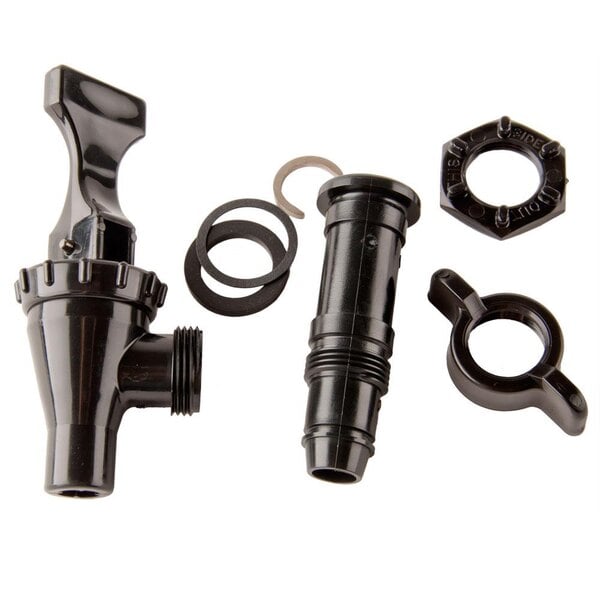
First verify you have all parts from the faucet and spout assembly. Our faucet kit, number 60267, consists of both the faucet and wing nut. The spout kit, part number 64003, includes the flat rubber washer, spout, fiber washer, hex nut, and stainless steel “C” ring. We will use Cambro’s 100 LCD for our demonstration. Begin by removing the existing faucet and spout, to do this, turn the wing nut in the clockwise direction until the faucet comes off. Remove the “C” ring by sliding it off. Press the wing nut downwards until it sits flush with the ribs on the hex nut. Turn the wing nut in a counter clockwise direction until the hex nut is loose. Remove the wing nut. Continue turning the hex nut by hand, in a counter clockwise direction, until you can remove the spout. The next step is adding the new faucet and spout. Place the rubber washer flush against the lip of the spout. Insert the spout with the flat rubber washer, attached through the hole in the Camtainer. Place the fiber washer around the spout. Place the hex nut, rib side up, on the spout and screw it on by turning it in a clockwise direction. Tighten the hex nut by using the wing nut, pushing it downward and turning it in a clockwise direction. Continue to tighten the hex nut until you are not able to tighten it any longer. Place the “C” ring on the spout in the slotted area. Take the faucet and place the threaded opening over the spout. Hold the faucet in place with one hand and tighten the wing nut by threading the nut on the threads of the faucet and turning in a counter clockwise direction. Tighten by hand until you are no longer able to tighten, and the wing nut is firmly in place. Congratulations you have now completed the faucet and spout kit assembly. When testing for leaks, use hot water. Make sure to wear the appropriate safety equipment to prevent the water from touching the skin. Fill the container and allow it to sit for five minutes. Look for any drops of water from the connection of the faucet to the spout. If drops are visible, simply empty the container and tighten the wing nut by turning it counter clockwise until you are unable to tighten it anymore. Test again with hot water, and empty and tighten until there are no visible leaks. That is how you test for leaks in your Camtainer faucet and spout assembly.
Embed Video

Copy and paste the embed code above.

Keep your Camtainer in perfect working condition with this Cambro faucet kit. This kit includes the Cambro 64003 spout assembly, as well as the Cambro 60267 faucet assembly. The spout assembly comes with a flat rubber washer, the spout, a fiber washer, a hex nut, and a "c" ring to assemble the spout on the inside of the Camtainer. The faucet assembly comes with the faucet, a rubber seat cup, and a wing nut to assemble the faucet on the outside of the Camtainer. This faucet kit will help to keep the hot chocolate and the coffee flowing, making beverage service a breeze.

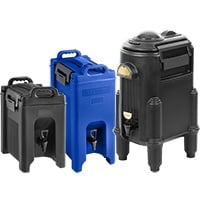
Compatible with Cambro 100LCD, 250LCD, 500LCD, and 1000LCD Camtainers; UC250, UC500, and UC1000 Ultra Camtainers.

Each Only:
$15.99 /EA

Quantity:


Our Item #: 214FAUCETKIT
Units: EA
Usually Ships 1 Business Day
When will I receive my Item?

Manufacturer's Item #:
60267 & 64003


View All Products From Cambro
Ask a Question about this Item


Have you used this product?

Login to write your own review and earn up to $16.00 with video, photo, and text reviews!

  • Write a text review
    Earn $2.00
  • Post a product photo
    Earn $4.00
  • Post a product video
    Earn $10.00


Why don't we show the price for this item?

Some manufacturers do not like it when we sell their products below their required minimums. In order to offer you the best possible deal, we ask that you simply place the item in your shopping cart to see our great price!

Why don't we show the price for this item?

We can sell this product for less than we're allowed to advertise!

One of our friendly Customer Service reps will be happy to give you the lowest possible price for this item! Click here for live chat, or call 717-392-7472 Monday through Friday, 8 a.m. to 8 p.m. EST.

Click here for live chat, or call 717-392-7472 Monday through Friday, 8 a.m. to 8 p.m. EST.

Call 717-392-7472 (Monday - Friday, 8 AM - 8 PM EST)

All Material Copyright © 2003-2013 The WEBstaurant Store
Food Service Equipment and Supply Company
All Rights Reserved